


FastStone Image Viewer Review: What Still Works & The Best Alternatives
Last Updated on May 21, 2026 by Rhea Cabalida
Stop fighting your file formats. If you have encountered the "File Not Supported" issue when opening your folders, that means you cannot rely on the computer’s default viewer; what you need is a dedicated tool like FastStone Image Viewer, which can handle HEIC, WebP, 4K video, and PDFs.
As someone who handles bulk files with various formats like RAW images from my Nikon camera, PDFs as sources for my articles, and digital files for content creation, there’s nothing more reassuring than having a dedicated viewer that does the job well. And that’s what a tool like FastStone Image Viewer should do.
This guide evaluates FastStone Image Viewer and the top industry-standard alternatives to help with your high-efficiency workflows.

In this Article
FastStone Photo Viewer: The All-Time Crowd Favorite
FastStone Image Viewer remains a reliable, lightweight choice for Windows users who prioritize batch processing and basic retouching. While FastStone Image Viewer is free for personal use, the interface lacks the modernization required for high-DPI displays and macOS cross-compatibility.
In this digital era, users demand more than just JPEG support. Modern creators juggle HEIC, WebP, and MP4 files in the same project folders. Using a legacy tool that requires extra plugins or separate apps for video creates unnecessary friction in your daily production.

👉 The Strength: FastStone Image Viewer offers an incredibly fast batch-rename and conversion engine. Plus, FastStone supports all major graphic formats, including BMP, JPEG, JPEG 2000, animated GIF, PNG, PCX, TIFF, WMF, ICO, and TGA. It also supports popular digital camera RAW formats, including CRW, CR2, NEF, PEF, RAF, MRW, ORF, SRF, and DNG.
👉 The Weakness: The cluttered interface design of FastStone Image Viewer can feel overwhelming for new users, and the lack of mobile integration limits it in a cloud-first world.
The bottom line is, FastStone is still a reliable image viewer. Despite its setbacks, it has useful resources and features that can be helpful in certain situations.
FastStone’s Best Feature: The 4-Way Comparison
Despite its setbacks, there is one thing experienced photographers unanimously like about FastStone, and it is the Synchronized 4-Way Comparison.
While modern tools like WidsMob Viewer Pro offer superior high-speed browsing for modern formats, FastStone’s "Compare" feature (Shortcut: P) remains the gold standard for technical culling. Unlike the basic grid views found in standard viewers, FastStone provides:
✅ Synchronized Panning & Zoom: When you zoom into 100% on one image, all four panes zoom and pan in unison. This is the ultimate tool for checking critical focus across a burst of nearly identical portraits or landscape brackets.
✅ Independent Metadata Overlays: Each of the four panes displays its own EXIF data (Shutter Speed, ISO, Aperture) at the top. This allows you to immediately diagnose why a specific shot in a series is sharper or noisier than the others without clicking away.
To use its full potential, don’t treat it as “just a viewer”; it's more than that. Its lossless JPEG rotation and ultra-fast batch renaming feature are just a few of its great options, but they are just buried under that confusing interface.
If your workflow involves processing hundreds of local files daily and you don't require macOS support, I would highly recommend FastStone. If not, check out some of the alternatives below.
⚠️ Testing Disclaimer: The Evaluation Standards
Apart from my personal experience in using some of these alternatives, I also put each tool through a standardized testing session using a mid-range Windows 11 PC and a MacBook Pro M3. To discover what these tools can offer, the evaluation focused on three critical performance metrics:
- Load Latency: I measured the time taken to render a folder of 100+ uncompressed RAW files and 8K HEIC images to test hardware acceleration claims. This will show if they are as fast as they say.
- Metadata Integrity: Verified each tool’s ability to read, edit, and strip EXIF/IPTC data without corrupting the original file structure.
- Format Versatility: Tested native compatibility with 2026 web standards, specifically focusing on transparency rendering in AVIF and WebP formats.
All software was tested in "offline mode" to verify privacy claims and ensure that core features remained functional without network connectivity.
Top FastStone Photo Viewer Alternatives
Selecting a FastStone Image Viewer alternative depends on specific workflow requirements, such as open-source flexibility or professional asset management. ImageGlass, XnView MP, and ACDSee Home represent the top-tier options for diverse user categories in 2026.
The Rising Star: WidsMob Viewer Pro
WidsMob Viewer Pro is a premier multimedia program designed for creators who manage photos, videos, and PDFs in a single interface. WidsMob Viewer Pro provides hardware-accelerated viewing for 8K video and HEIC files, outperforming legacy Windows viewers.

WidsMob Viewer Pro solves the format fatigue problem by acting as an all-in-one media utility tool. It lets you scroll through high-res RAW images, 8K videos, and PDF documents in a single window without lag. This means you can cull your best shots and clips in one session and with just one program.
WidsMob’s Mixed-Media Edge
I've had my fair share when it comes to testing and personally using legacy and latest viewers, but with WidsMob Viewer Pro, you get more than just the expected features. WidsMob allows users to scroll from a RAW image directly into a playing MP4 or MOV file. This fluid navigation eliminates the need for multiple apps, positioning WidsMob Viewer Pro as a high-efficiency media hub.
WidsMob Viewer Pro excels in three specific areas:
- Platform Parity: WidsMob Viewer Pro offers an identical experience on Windows 11 and macOS, perfect for hybrid teams.
- Privacy-First Metadata: Users can view and strip EXIF data instantly before uploading to social platforms.
- Format Future-Proofing: Native support for WebP, AVIF, and PDF ensures WidsMob Viewer Pro handles 2026 web standards without lag.
How to Use WidsMob Viewer Pro
Step 1: Launch WidsMob Viewer Pro and set WidsMob Viewer Pro as your default media handler.
Step 2: Open any folder to view thumbnails for photos, videos, and PDFs simultaneously.

Step 3: Double-click a file to enter full-screen mode and use the arrow keys to navigate the entire folder.
Step 4: Apply batch conversions to WebP or JPEG to prep your files for web use instantly.
The Speedster: ImageGlass
ImageGlass is the standard for users seeking an open-source, minimalist aesthetic. It prioritizes viewing speed and a clean UI, making ImageGlass the ideal choice for users who find the FastStone Image Viewer interface too cluttered.
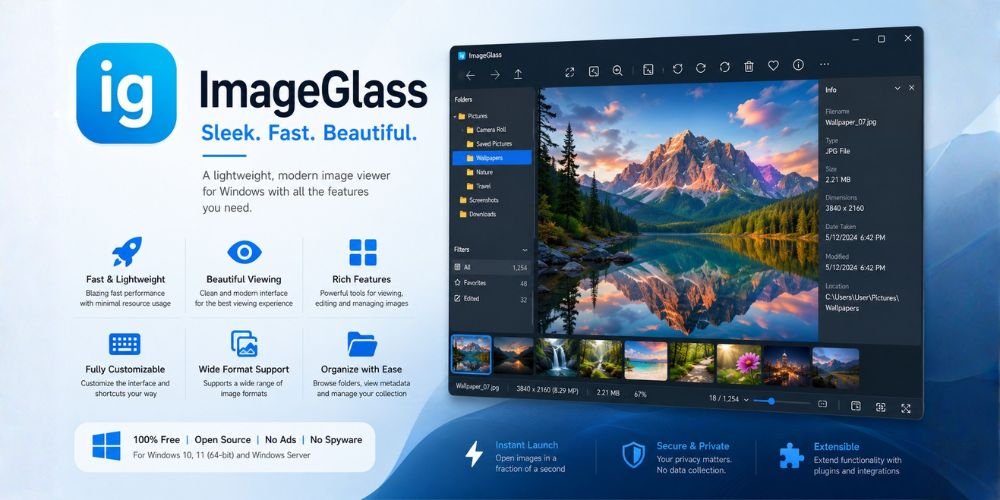
ImageGlass offers a modern alternative for users who want a simple, lightning-fast experience, plus it supports over 80 formats and features a highly customizable layout. Making it the perfect viewer for those who prioritize speed over heavy editing tools.
The Metadata Specialist: XnView MP
XnView MP is a powerful, multi-platform media browser that supports over 500 file formats, including animated APNG and TIFF (based on experience, tools that support these two are pretty rare). XnView MP also offers deep metadata management and batch processing across Windows, macOS, and Linux operating systems. These features are pretty helpful, especially if you're someone like me who manages bulk files.

XnView MP provides a consistent experience for users who switch between different operating systems, like moving from a Mac at home to a Windows PC at work. Experienced users rely on this program for its lossless cropping and automatic EXIF rotation features. It is a favorite for people who need to manage huge libraries of photos because it handles "hidden" photo details—like exactly when and where a picture was taken; better than almost any other tool.
The Professional Organizer: ACDSee Home
ACDSee Home serves as a professional-grade alternative for users who require robust media management and integrated cloud syncing. ACDSee Home features advanced organizational tools like hierarchical keywords and Microsoft OneDrive integration for enterprise-level efficiency.
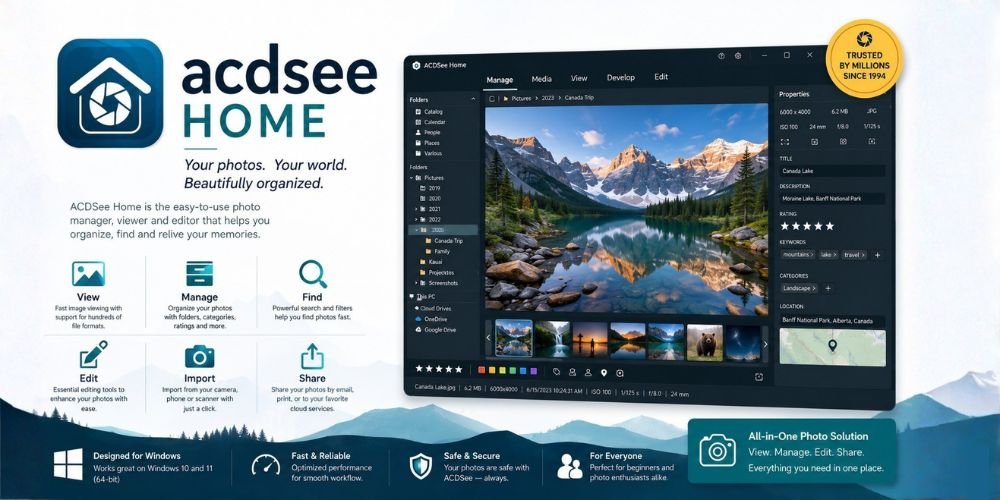
ACDSee Home excels at handling massive libraries with high-DPI support for 4K monitors. Professionals use ACDSee Home to categorize, tag, and repair photos within a single, high-performance environment. It's one of the best choices for users who need a commercial-grade bridge between local storage and the cloud.
Final Verdict: Choosing the Tool That Suits Your Workflow
While FastStone Image Viewer remains the king of local Windows efficiency, the alternatives listed above offer specialized features for hybrid and high-volume workflows. Which is what we need in today's content creation craze.
| Tool | Best Use Case | Platform | Hardware Acceleration | Key Info Gain Feature | 4-Way Sync Zoom |
|---|---|---|---|---|---|
| FastStone | Technical Culling | Windows | No (Legacy) | Hidden "Hot-Edge" UI | Yes (Best in Class) |
| WidsMob | Mixed Media (8K/HEIC) | Win/Mac | Yes (GPU) | Single-window "Media Bridge" | No (Gallery Mode) |
| ImageGlass | Minimalist Viewing | Windows | Yes (Shader) | Native AVIF/WebP support | No |
| XnView MP | High-Volume Metadata | Win/Mac/Linux | Yes (Multi-core) | Batch Convert 2.0 layers | Limited |
| ACDSee Home | Library Management / Categorization | Windows | Yes | — | — |
Quick Recommendations:
- For Windows Enthusiasts: Stick with FastStone Image Viewer. It is the most reliable, "no-nonsense" tool for fast local editing and batch processing.
- For Hybrid Teams (Mac/PC): Choose WidsMob Viewer Pro. Its identical cross-platform experience and support for 2026 formats like AVIF make it the best for modern media mixes.
- For Minimalists: Go with ImageGlass. It offers the cleanest, most modern Windows 11 interface without any unnecessary bloat.
- For Technical Experts: Use XnView MP. It provides unmatched metadata control and versatility for those handling obscure file formats on Linux or macOS.
- For Large Libraries: Opt for ACDSee Home. Its AI-driven organization is the fastest way to manage terabytes of scattered photos.
After dealing with a bunch of viewer programs, here’s what I can say: the best image viewer isn't just about opening a file; it’s about how it fits your specific hardware and file management needs.